Cpu profiling
There are two complementary objectives:
get a big picture of where the time is spent
cProfile, pstats(standard) orpyinstrument(external dependency). For comments on deterministic vs statistical profiling.monitor the performance of the most important functions (potentially as a function of the input size) with
timeit. The goal can be to confirm a potential theoretical complexity analysis.
During an optimization phase, it is mandatory to choose between different solutions based on empirical evidence.
 1from collections.abc import Callable
 2import cProfile
 3import io
 4from pathlib import Path
 5import pstats
 6
 7import time
 8from timeit import timeit
 9
10
11import pyinstrument
src
 1def profile(func: Callable[[], None], display: bool = True) -> dict:
 2    profiler = cProfile.Profile()
 3    profiler.enable()
 4    func()
 5    profiler.disable()
 6    stream = io.StringIO()  # opens a in-memory file
 7    stats = pstats.Stats(profiler, stream=stream)
 8    # tottime is total time spent in the function and not in callees
 9    # cumtime is total time spent including time in callees
10    stats.strip_dirs().sort_stats("tottime").print_callees()
11    if display:
12        print(stream.getvalue())
13    return stats.all_callees  # type: ignore
src
 1def example() -> None:
 2    nb_loops: int = 3
 3    base_duration: float = 0.01
 4    path_from_root = Path("docs/source/tools_methods/profiling")
 5    path = Path(__file__).parents[3].resolve() / path_from_root
 6    output = "profile.html"
 7
 8    def single() -> None:
 9        time.sleep(base_duration)
10
11    def repeated() -> None:
12        time.sleep(base_duration)
13
14    def do_something():
15        single()
16        for _ in range(nb_loops):
17            repeated()
18
19    # std module
20    _ = profile(do_something)
21
22    # pyinstrument
23    with pyinstrument.Profiler() as profiler:
24        do_something()
25    profiler.print()
26    profiler.write_html(path / output)
27
28    # timeit
29    print(timeit(single, number=1))  # -> 0.01 s
The built-in package cProfile gives:
Ordered by: internal time

Function                                          called...
                                                      ncalls  tottime  cumtime
{built-in method time.sleep}                      ->
test_cpu.py:24(do_something)                      ->       1    0.000    0.010  test_cpu.py:18(single)
                                                           3    0.000    0.030  test_cpu.py:21(repeated)
test_cpu.py:21(repeated)                          ->       3    0.030    0.030  {built-in method time.sleep}
test_cpu.py:18(single)                            ->       1    0.010    0.010  {built-in method time.sleep}
{method 'disable' of '_lsprof.Profiler' objects}  ->
which corresponds to the call graph:
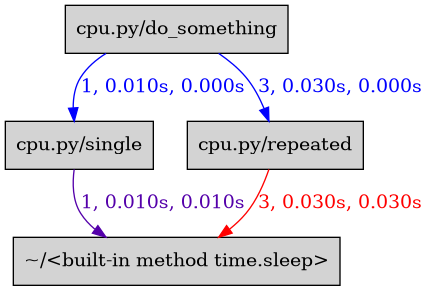
Call graph
the package pyinstrument returns:
0.040 example  cpu.py:31
└─ 0.040 do_something  cpu.py:44
   ├─ 0.030 repeated  cpu.py:41
   │  └─ 0.030 sleep  <built-in>
   └─ 0.010 single  cpu.py:38
      └─ 0.010 sleep  <built-in>